TL;DR: .faf is ROM — persistent, portable, yours forever. tri-sync adds RAM: it auto-syncs with Claude's MEMORY.md. For builders, serious coders, and app-makers.
What is .faf?
Think of package.json. Every developer knows it. It tells Node what your project needs. Now imagine a file that tells AI what your project is.
That's project.faf. The README for AI. The package.json for AI context.
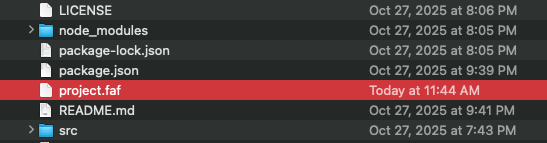
project.faf sits at the root, right next to package.json. One file. Always there.
It lives at the root of your project. It's YAML. It's structured. And every AI tool — Claude, Gemini, Grok, Cursor — can read it instantly. No more explaining your project from scratch every session.
The 3Ws — Everyone Can Have an App
You don't need to be a developer to describe an app idea. You just need 3 answers.
That's it. Three questions anyone can answer. A teacher, a chef, a parent with an idea for an app — they don't need to know TypeScript or React. They just need WHO, WHAT, WHY.
We built a page for this: faf.one/ideas. Type 3 answers, get a project.faf. Hand it to any AI and start building.
The first 3 = the idea
Anyone can answer WHO, WHAT, WHY. That's the whole point.
The 6Ws — The Full Picture
The 3Ws describe the idea. The next 3 describe the implementation. Together they're the 6Ws — the complete DNA of any project.
In v5.0.0 we reordered the 6Ws. WHY moved from 4W to 3W. The split is now clean:
WHO, WHAT, WHY
Anyone can answer theseWHERE, WHEN, HOW
Developer fills these inAll 6 answers live in one file: project.faf. The README for AI. The package.json for AI context.
tri-sync — ROM meets RAM
.faf has always been ROM. Persistent project context that survives anything. bi-sync mirrors it to CLAUDE.md. That's free, and always will be.
tri-sync adds the third leg: RAM. It auto-syncs your project context to Claude's MEMORY.md — the file Claude Code auto-loads into every session. Your AI remembers across sessions.
bi-sync = ROM (.faf) ↔ CLAUDE.mdtri-sync = ROM ↔ CLAUDE.md ↔ RAM (MEMORY.md)faf tri-sync faf ram faf bi-sync --ram Pro Gate — Zero Friction
tri-sync is a Pro feature. 14-day free trial, no signup, no credit card. Run a Pro command and you're in.
After the trial? bi-sync keeps working. You just lose the RAM leg. No crash, no guilt trip, no dark patterns.
faf pro Early-bird: $3/mo · $19/yr (normally $10/mo — 70% off)
The Triangle
| Sync | Target | Status |
|---|---|---|
| bi-sync | .faf ↔ CLAUDE.md | Free forever |
| bi-sync | .faf ↔ AGENTS.md, .cursorrules, GEMINI.md | Free forever |
| tri-sync | .faf ↔ CLAUDE.md ↔ MEMORY.md | Pro |
Try It
npm install -g faf-cli@5.0.0 npx faf-cli@latest tri-sync The Numbers
- v5.0.0 — Released March 1, 2026
- 1,100/1,100 — Tests passing (49 suites)
- 83% — FAF Score (Bronze)
- 33,000+ — Total downloads (11 packages, 3 registries)